
Documents are the universal truth across organizations of all sizes. Proposals, contracts, invoices, and compliance documents are all part of business operations. Enterprises use approved document templates for each of these document types. Whereas, databases hold the data that goes into these document templates for business documents production.
Re-key data into templates wastes time and resources. Hence, businesses look to automate document creation from SQL files. An ideal solution would populate the SQL Server/Oracle/MySQL data into Word/PDF document templates for Docx and PDF documents generation. It also should allow bulk/on-demand document creation. Smartly choosing the right approach can save you thousands of dollars and countless hours.

It is designed for business users to generate business documents without IT support. Generate documents from SQL Server in a simple 2-step process.
In the connection screen, select the SQL server from the drop-down. Then enter the connection URL in the "username@hostname[:port]/DatabaseName" format and the password to access the database.

In the query, you can use native SELECT statements. Below are the sample MSWord template and the associated query for populating it. The system populates the table, image, and dynamic text fields in the template from the database fields.


SELECT
  invoice.inv_no,
  `logo`,
  `date`,
  `trms_pymnt`,
  `po_ref`,
  `name`,
  `address`,
  `contact`,
  `Email`,
  `Phone`,
  `myhtml`,
  para,
  CONCAT(
    '[',
    GROUP_CONCAT(
      CONCAT(
        '{"amnt":"',
        amnt,
        '", "descrptn":"',
        descrptn,
        '"}'
      )
    ),
    ']'
  ) IT
FROM
  `invoice`,
  `inv_item`
WHERE
  invoice.inv_no = inv_item.inv_no
Group BY
  invoice.inv_no;
The system supports all types of queries including SQL joins.
Business documents are complex. Most of them would need the population of tables, images, HTML, Blob, etc. The system supports all these scenarios.
Tables
The system supports the creation of tables, loops, and lists from DB data. You can also create nested tables up to 6 levels. For nested tables, fetching data in JSON and XML formats through SQL queries is advisable. Take the example of "Order table".
|
Sales Order |
Order Status |
|
12345 |
5 |
|
-- |
-- |
Below is the query that populates this table. It fetches the data in XML format.
Similarly, the below query fetches the data in JSON format.
Images
You can store the images in Base64 format or external image URLs. Include these columns in your SELECT query for the population.
Content Blocks/Sub-templates
You can store them as Blobs and include them in your SELECT statements.
HTML
The system supports the population of HTML, graphs, and charts.
After entering all mandatory fields, click on the "Connect" button to check the connection. In the next step, the system populates query data into your template and generates the documents.
The system supports the filling of dynamic text, tables, paragraphs, hyperlinks, blobs, and images from SQL data into document templates.
You don't have to do any data transformation and can populate data as-is. You have the option to map the template's dynamic fields to the query columns. If both names match, the system automatically maps them for you. Thus, database changes don't affect document creation.
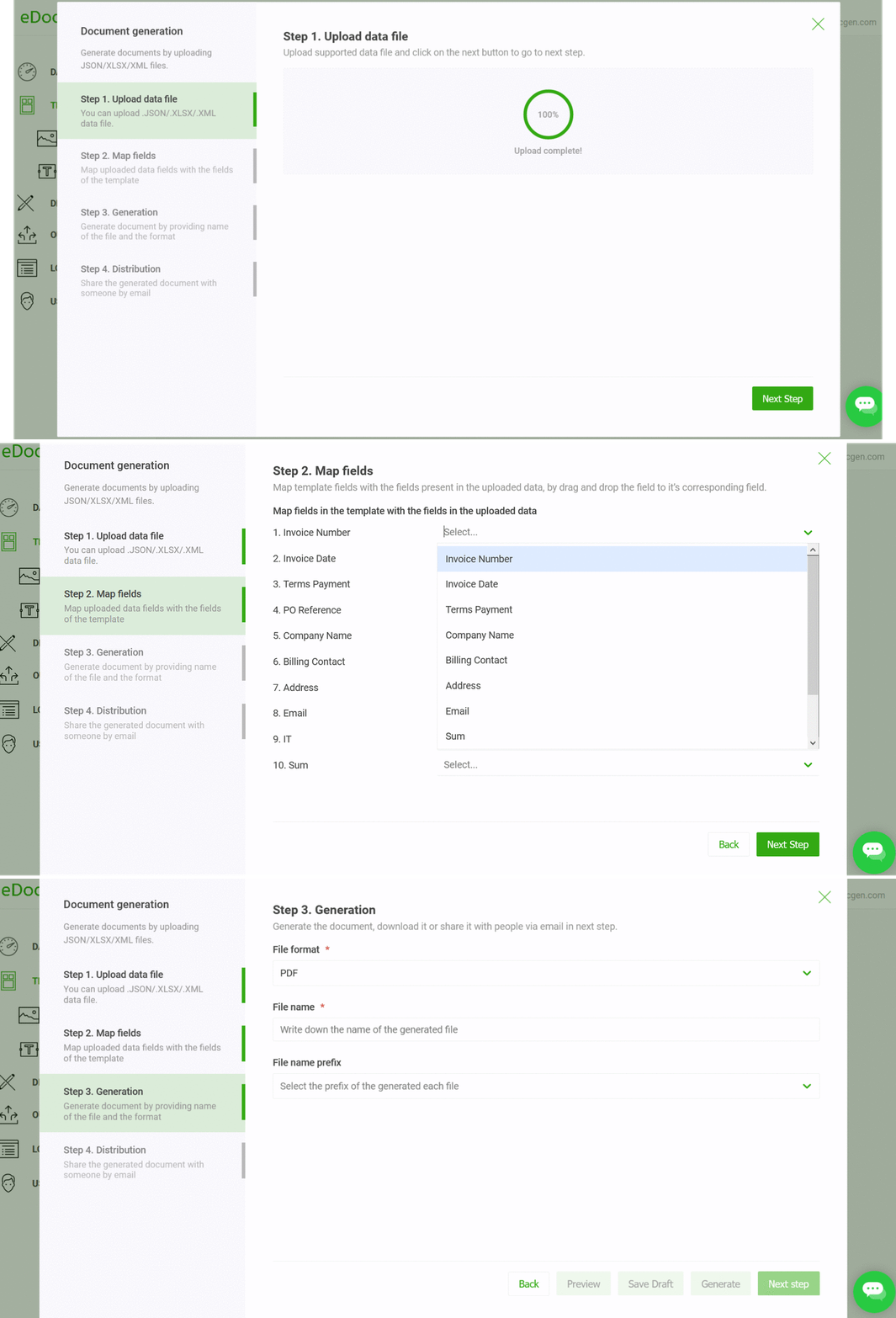
There are various distribution channels available, including downloading, sending them for printing, emailing, esigning, or syncing them with cloud storage platforms such as OneDrive, SharePoint, and S3 bucket.
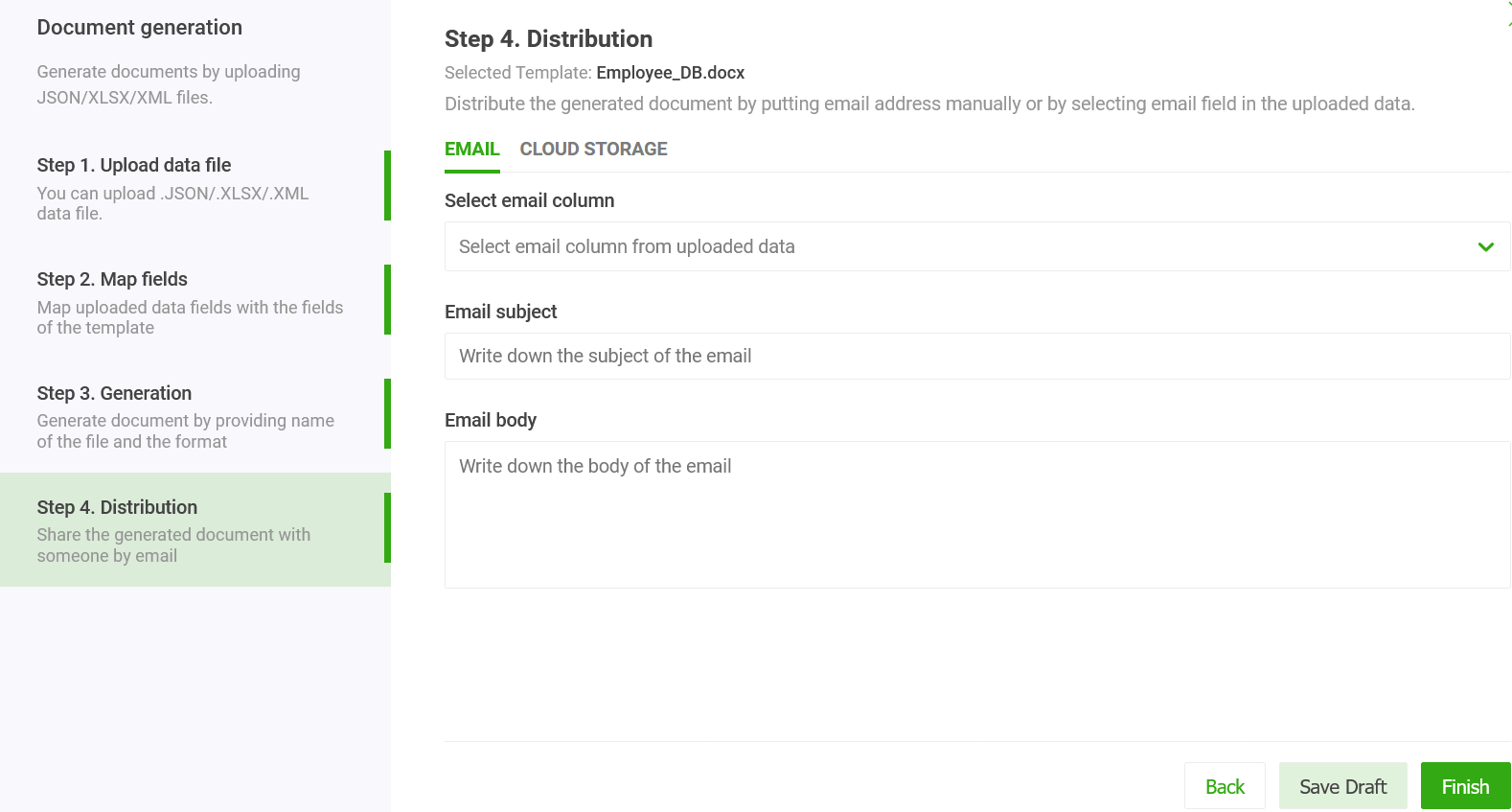
You have an option to send generated documents individually by mail as an attachment. Select the email column in the query, input your mail subject & body, and click the send button. The system auto-sends these emails from your business email.
In addition to the web app, EDocGen also offers REST API for SQL to Word file format generation. There is comprehensive developer documentation available. By integrating with API,
You can use
If you use the same template and query for every document generation cycle, entering the information is time-consuming and tedious. The system provides options to automate these steps.
To create automation, follow the above steps. After that, the generation of Word documents is as simple as clicking a button.

The system additionally provides choices for scheduling the generation.

There is also an option to automatically create printer-friendly PCL5 and PostScript files and upload them to an FTP server.

Templates vary in complexity. Often, you find templates with multiple tables, nested tables, lists, etc. Below is the sample template.
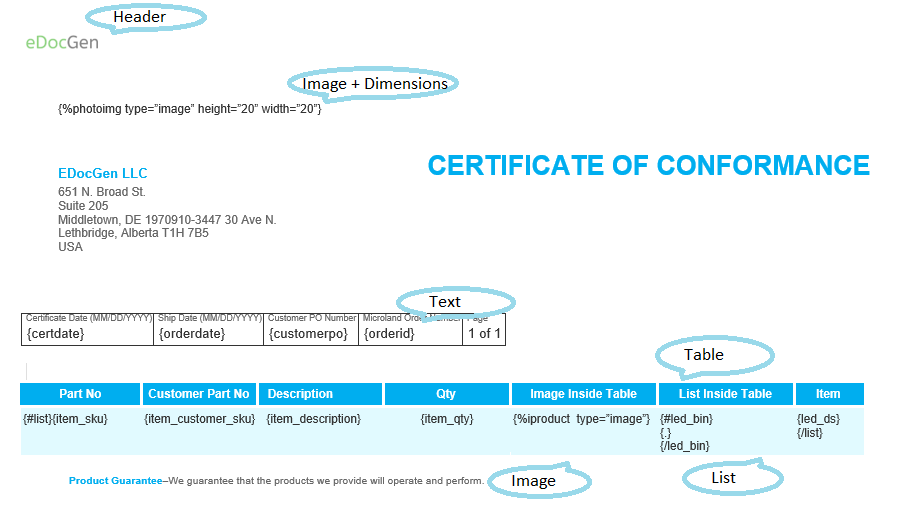
You can generate documents from it with the same approach. You only need to change the SQL queries to retrieve the data in XML/JSON format.
If you don't want to enter connection details for security reasons, you may download the SQL Server data in XML/JSON format and use it for document generation. Please refer to XML to Word and JSON to Word that detail how to go about the XML and JSON population.
EDocGen connects directly to SQL Server, reads the fields you map, and merges them into placeholders in a Word template. You design the template in Word, insert merge fields linked to table columns or query results, and EDocGen fills them to produce a finished .docx file for each record, ready for review or distribution.
Yes. EDocGen generates both Word and PDF output from the same SQL-driven template. After merging the data into a .docx, it can export each document as a PDF, giving you locked, print-ready files for distribution while keeping the editable Word version for archiving or further changes. You choose the output format per job or per template.
Yes. EDocGen supports bulk generation by running a SQL query that returns many rows, such as all customers with open invoices, and producing one document per record in a single batch. This suits monthly statements, certificates, and contracts. Output files can be named using database fields, and batches can be scheduled or triggered on demand.
No. EDocGen works with existing SQL Server databases without schema changes. You point it to a connection, write or select a query or stored procedure, and map the returned columns to template fields. Read-only access is typically sufficient, so your production tables and applications stay untouched while documents are generated from current data.