
Businesses create a variety of documents in PDF file format from SQL Server data. They populate SQL data into PDF/Word templates for creating business documents in PDF format. However, SQL PDF document creation is tricky and complex, and almost all popular approaches are not business user-friendly.
EDocGen is the simplest and best approach for creating PDF documents from SQL file. You can populate SQL data into existing Word or PDF templates as-is. The system supports the creation of password-protected PDFs with watermarks.
Using EDocGen, the generation of PDF documents from SQL Server is a simple two-step process.
Business users can populate DB data into existing templates, without IT intervention. Since templates are in PDF/Word/PPTX format, business users can edit them in native editors. No separate plug-in/add-on is needed.
In the connection screen, select the "SQL Server" option from the drop-down.Then enter the connection URL in the "username@hostname[:port]/DatabaseName" format, password, and the native SQL query.

In the query, you can use native SELECT statements. Below are the sample MSWord template and the associated query for populating it. The system populates the table, image, and dynamic text fields in the template.


SELECT
  invoice.inv_no,
  `logo`,
  `date`,
  `trms_pymnt`,
  `po_ref`,
  `name`,
  `address`,
  `contact`,
  `Email`,
  `Phone`,
  `myhtml`,
  para,
  CONCAT(
    '[',
    GROUP_CONCAT(
      CONCAT(
        '{"amnt":"',
        amnt,
        '", "descrptn":"',
        descrptn,
        '"}'
      )
    ),
    ']'
  ) IT
FROM
  `invoice`,
  `inv_item`
WHERE
  invoice.inv_no = inv_item.inv_no
Group BY
  invoice.inv_no;
The system supports complex queries including SQL joins.
Tables
The system supports the creation of tables, loops, and lists from DB data. You can also create nested tables of up to 6 levels. If your template has many tables, nested tables, lists, etc., then fetching data in JSON and XML formats through SQL queries is the best approach. Take the example of "Order table".
|
Sales Order |
Order Status |
|
12345 |
5 |
|
-- |
-- |
Below is the query that populates this table. It retrieves the data in XML format.
Similarly, the below query retrieves the data in JSON format.
Images
Fetch them through SELECT statements for the population. They can be in Base64 format or image URLs.
Content Blocks/Sub-templates
You can store them as Blobs and include them in your SELECT statements.
HTML
The system supports the population of HTML, graphs, and charts.
The next step is to populate query data into the document template.
The data population doesn't require any data transformation. Business users can populate data as-is. There is an option to map the template's dynamic fields to the query columns. If both names match, the system automatically maps them for you. In the above example, you would notice that the template's tag names match with database column names. Thus, database changes would never affect PDF generation.

After mapping, select PDF as the output format and click the generate button. The system generates a ZIP that contains generated PDF documents. You can also encrypt the PDFs and create watermarks.

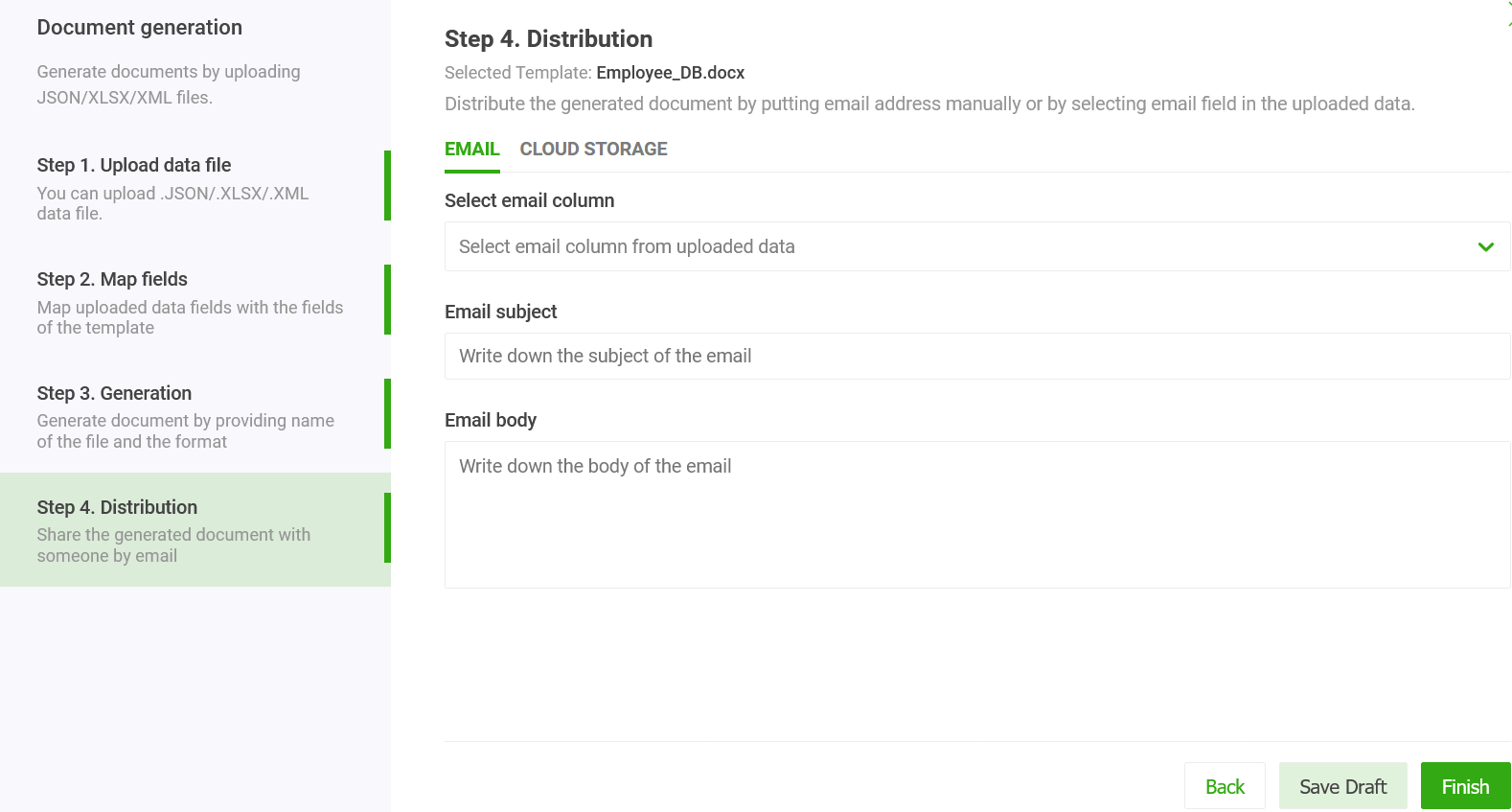
This is an optional step. The system allows you to send generated individual documents from your business email. In the distribution screen, select the column for the email field in the drop-down. Then enter the custom email subject and email body. On clicking generate, the system sends the documents to individual recipients as an attachment. You can also use the dynamic fields in the email body and subject. Apart from Email, the system supports other distribution channels including print, sync to cloud storage, and document archival.
Below is an example of a complex template with nested tables and nested loops.
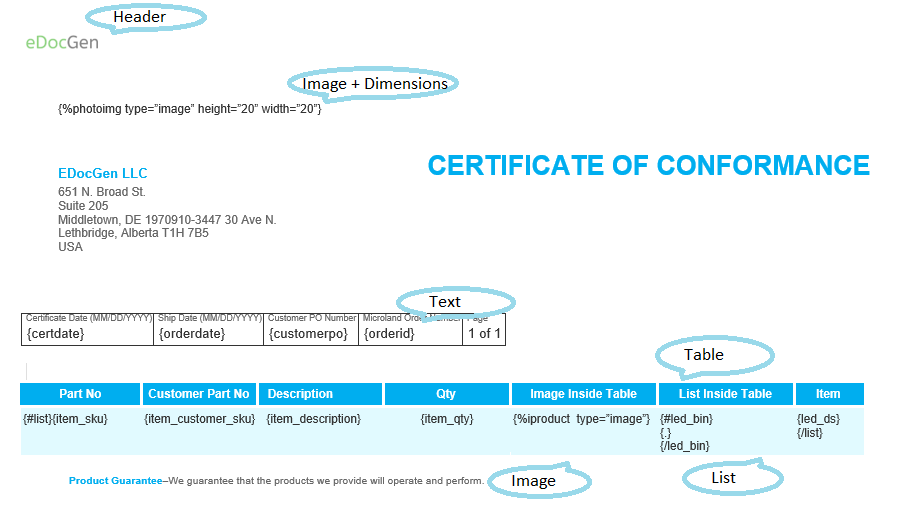
Table data as XML
Fetching data from SQL Server in XML format can be achieved via the SELECT statement. It is used regularly by DBAs and business users alike. The SELECT statement with "FOR XML" clause in the query retrieves table data as XML nodes. FOR XML takes different arguments – RAW, AUTO, or EXPLICIT.
Similarly, fetch data from SQL Server as JSON by adding the "FOR JSON" clause to the SELECT statement. When you use the FOR JSON clause, you can specify the structure of the JSON output explicitly, or let the structure of the SELECT statement determine the output.
To maintain full control over the format of the JSON output, use FOR JSON PATH. You can create wrapper objects and nest complex properties. FOR JSON takes different arguments – RAW, AUTO, or EXPLICIT. To format the JSON output automatically based on the structure of the SELECT statement, use FOR JSON AUTO. However, The system accepts any valid JSON and no data transformation is necessary.
In the latest editions of SQL servers, you can store and query JSON documents as in a NoSQL database.
If you don't want to enter connection details for security reasons, you may export data from the SQL Server in XML/JSON format and use it for document generation. Please visit Azure SQL Server PDF generation for a detailed description of how to go about it.
The process of entering the query and connection details each time you generate documents can be both time-consuming and tedious. The system offers features to streamline these steps through automation.
To create automation, follow the below steps. After that, the generation of PDF documents is as simple as clicking a button.

The system provides the functionalities to pull data from multiple sources—including databases (like SQL, Oracle, and MongoDB) and CRMs (like Salesforce and Dynamics 365)—and seamlessly merges the data for document generation.
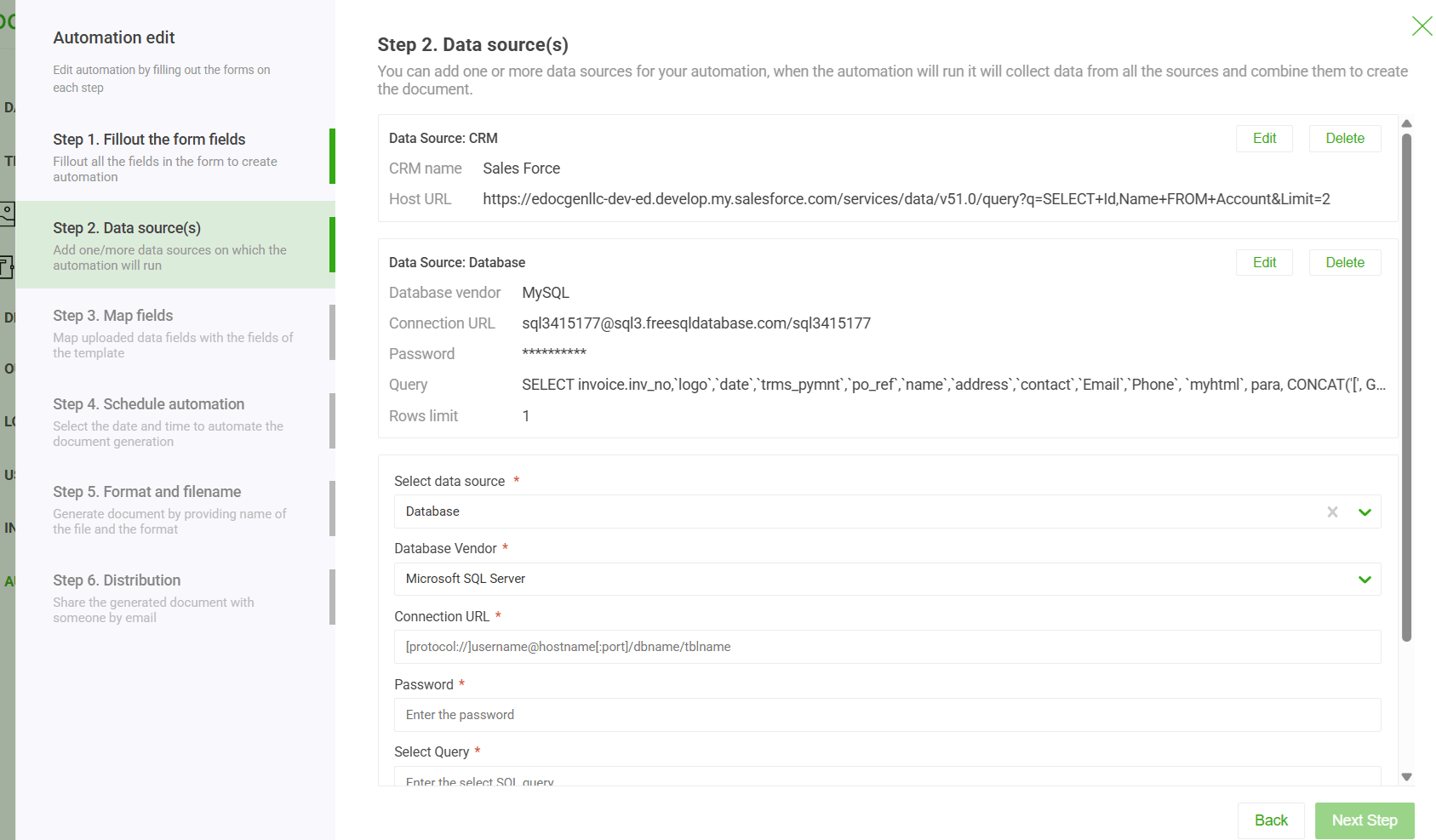
Also, the system offers options to schedule the generation every day/month/year.

There is also an option to automatically create printer-friendly PCL5 and PostScript files and upload them to an FTP server.

The platform automatically populates your templates by pulling data from wherever it lives—whether that’s across different databases, schemas, or your CRM. This means you can effortlessly merge information from a variety of sources—such as multiple databases, or even a combination of databases and CRM systems—to populate your template. Thus, the system eliminates the headache of complex data handling.

EDocGen is an API-first product. This entire document generation process can be automated by integrating with EDocGen REST API. You can automate the bulk/on-demand PDF generation from SQL Server. Documents from Oracle and MySQL can also be produced in a similar manner.
In summary, EDocGen document generation software is the perfect solution for SQL to PDF documents creation. It supports the filling of dynamic text, tables, paragraphs, blobs, hyperlinks, and image files from SQL Server data into existing PDF/Word templates.
It is highly secure and integrates into your ecosystem. Schedule a demo for more details.
Yes. EDocGen is a DIY, no-code platform. Business users can connect to SQL Server, enter a SELECT query, and populate data into existing Word or PDF templates without any developer involvement. Templates are edited in native editors like Microsoft Word — no plug-ins or add-ons required.
EDocGen supports SQL Server (including Azure SQL Server), Oracle, and MySQL for PDF and Word document generation. The connection accepts a standard connection URL with username, hostname, port, and database name.
Yes. EDocGen supports complex native SQL SELECT statements including JOINs, GROUP BY, and subqueries. It also supports FOR XML and FOR JSON clauses for retrieving structured table data, which is the recommended approach when templates contain nested tables or multi-level loops.
Yes. EDocGen supports nested tables up to 6 levels in PDF and Word documents. For complex templates with nested tables, using SQL queries with FOR XML or FOR JSON clauses to retrieve data in structured XML or JSON format is the recommended approach.
Yes. EDocGen supports the creation of password-protected PDFs and allows you to add watermarks to generated documents during the output step.
Yes. EDocGen's automation feature can pull data from multiple sources — such as SQL Server, Oracle, MongoDB, Salesforce, and Dynamics 365 — and merge them seamlessly into a single document template, eliminating the need for complex data pre-processing.
Yes. EDocGen supports scheduled document generation. Once an automation workflow is configured, you can schedule PDF generation to run daily, monthly, or yearly without manual intervention. The system can also generate printer-ready PCL5 and PostScript files and upload them to an FTP server automatically.
Yes. If you house target files inside your database as Base64 text formats, live URLs, or keep template modules as system Blobs, you can write regular SELECT commands to dynamically inject graphs, charts, images, and raw HTML formatting into the file payload.
Yes. EDocGen is an API-first product and provides a REST API that enables programmatic SQL to PDF generation. It can be integrated into any application or workflow to trigger on-demand or bulk document generation directly from SQL Server data.
No. EDocGen handles SQL Server database integrations natively. There are no secondary plug-ins or platform add-ons required to extract query structures and translate them directly into finalized layouts.