
Template-based PDF document creation is the process of using ready-made templates and variable data to create professional, standardized documents. This document creation method is commonly used in business environments to streamline and automate the creation of documents such as invoices, bills, reports, etc.
Python is a programming language known for its flexibility and effectiveness in automating tasks. EDocGen allows users to generate PDF documents in Python using templates. With it, businesses can quickly and easily generate thousands of documents from various data sources such as JSON, XML, Excel, databases, and business applications. Generated documents can be distributed through diverse channels such as email, e-signature, etc. to provide a personalized and end-to-end experience to customers.
This article describes the system’s possibilities for the template-based generation of PDF documents using Python 3.14.
Before you start, make sure you have Python 3.14 (the current release — 3.12 or later will also work fine for everything in this article). Check your version with:
python --version
Then set up a project with a virtual environment and the two dependencies this example uses — requests for HTTP and python-dotenv for loading credentials from a .env file:
          python -m venv .venv
source .venv/bin/activate  # .venv\Scripts\activate on Windows
pip install requests python-dotenv
pyproject.toml:
          [project]
name = "edocgen-pdf-generation-example"
version = "1.0.0"
description = "Template-based PDF document generation example using the EDocGen REST API"
requires-python = ">=3.11"
dependencies = [
    "requests>=2.32",
    "python-dotenv>=1.0",
]

[tool.setuptools.packages.find]
where = ["src"]
Copy .env.example to .env and fill in your real credentials — this file is never committed to source control:
        EDOCGEN_BASE_URL=https://app.edocgen.com
EDOCGEN_USERNAME=
EDOCGEN_PASSWORD=
EDOCGEN_DEFAULT_TEMPLATE_ID=
        pyproject.toml
.env.example
src/
  edocgen/
    __init__.py
    client.py
    models.py
    exceptions.py
examples/
  _bootstrap.py
  generate_from_json.py
  generate_from_database.py
  email_output.py
EDocGenClient: The single class that talks to the EDocGen API — login, template lookup, document generation from JSON or a database, polling for output, downloading, and emailing.
OutputFormat: A StrEnum (PDF, DOCX, PPTX) that replaces the loose "pdf" string literals scattered through the original functions.
DatabaseSource: A frozen dataclass holding the database vendor, connection URL, query, and row limit for database-driven generation, replacing the six loose local variables in the original downloadBulkDB() method.
Exceptions: LoginError and DocumentGenerationError (both extending a base EDocGenError) so calling code can catch specific failure modes instead of letting an unrelated KeyError propagate from three calls deep.
EDocGen’s API makes it easy for developers to automate document generation with just a few lines of code. It supports various modes such as:
Its flexibility makes it suitable for use in any document generation scenario within an enterprise. We’ll go through each use case, using the same three-step flow as before — authenticate, generate, then download or email — just backed by a proper client class this time.
The API uses a JWT-based authentication token for all API interactions. You register and obtain an access token by passing your username and password to the /login endpoint. You’ll need this token for every subsequent API call.
Here’s login() and the property that triggers it automatically:
          def login(self) -> str:
    """Authenticates against ``/login`` and caches the access token.

    Called automatically on first use — you rarely need to call this directly.
    """
    try:
        response = self._session.post(
            f"{self._base_url}/login",
            json={"username": self._username, "password": self._password},
            timeout=30,
        )
        response.raise_for_status()
    except requests.RequestException as exc:
        raise LoginError(f"Unable to reach EDocGen login endpoint: {exc}") from exc

    token = response.json().get("token")
    if not token:
        raise LoginError("Login response did not include an access token.")

    self._token = token
    log.info("Authenticated with EDocGen")
    return token

@property
def _auth_headers(self) -> dict[str, str]:
    return {"x-access-token": self._token or self.login()}
The token now lives on self, not on the class itself — in the original example, eDocGenapi.token = x_access_token set a class attribute, which means every instance of eDocGenapi in a process would share the same token, including the last one to log in overwriting everyone else’s. Here, _auth_headers checks self._token first and only calls login() if it’s still None, so authentication happens exactly once per client instance, lazily, on whichever call needs it first.
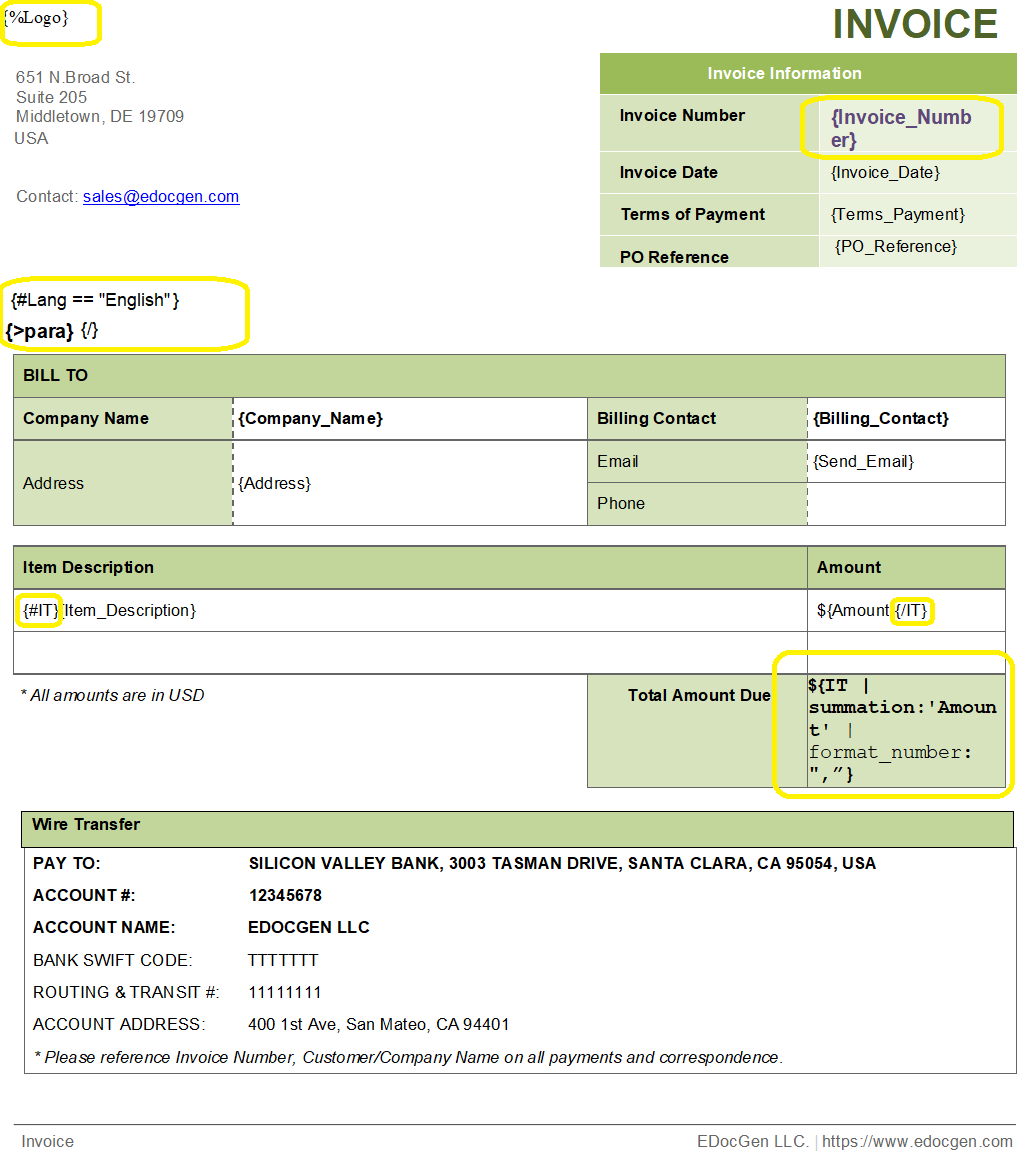
Our system gives you the flexibility to customize and upload your own templates. If you already have a document ready, your first step is to make a few quick edits to add dynamic fields, which tell the system exactly where to inject your data.
Depending on your file type, you can easily create or edit your template using Microsoft Word or a PDF editor.
To make a field dynamic, simply enclose your variables in curly braces
{}
. In our system, these are called Tags.
Standard Fields: Variables like
{Invoice_Number}
and
{Invoice_Date}
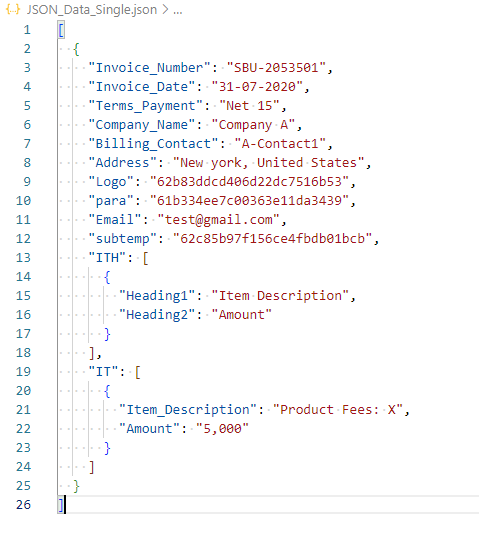
will automatically populate with your specific input data.
Dynamic Tables: You can generate repeating rows in
a table by wrapping your table row data between opening and closing
tags, like this:
{#tablename}
and
{/tablename}
.
Similarly, you can add tags for images, paragraphs, hyperlinks, graphs, etc. to the template.
This is a one-time activity; every record run against the template afterward reuses it.
Once the template is ready, upload it either from the system UI (Templates → Upload) or via the API:
| Method | Endpoint | Description |
|---|---|---|
| POST | /api/v1/document | Upload template to the system |
| Parameter | Type | Description |
|---|---|---|
| documentFile | file | (formData) file to upload |
Once your template is uploaded, retrieve its ID — useful for every later API call against that template:
| Method | Endpoint | Description |
|---|---|---|
| GET | /api/v1/document/{filename} | Returns all template details |
          def get_template_ids_by_filename(self, filename: str) -> list[str]:
    """Looks up template IDs by the file name they were uploaded with."""
    response = self._request(
        "GET",
        "api/v1/document",
        params={"search_column": "filename", "search_value": filename},
    )
    documents = response.json().get("documents", [])
    return [document["_id"] for document in documents]
Every method above goes through one shared _request() helper that turns any requests failure into a typed exception:
          def _request(
    self,
    method: str,
    path: str,
    *,
    error_cls: type[EDocGenError] = EDocGenError,
    **kwargs,
) -> requests.Response:
    try:
        response = self._session.request(
            method,
            f"{self._base_url}/{path}",
            headers=self._auth_headers,
            timeout=kwargs.pop("timeout", 30),
            **kwargs,
        )
        response.raise_for_status()
    except requests.RequestException as exc:
        raise error_cls(f"EDocGen API request failed ({method} {path}): {exc}") from exc

    return response
To generate a document, the following endpoint is used, same as before:
| Method | Endpoint |
|---|---|
| POST | /api/v1/document/generate/bulk |
| Parameter | Description | Type |
|---|---|---|
| documentId | id of the template | Form Data |
| format | pdf/docx (must be supported by the template) | Form Data |
| outputFileName | the file name for the output file | Form Data |
| inputFile | file containing marker values — JSON, XLSX, or XML | Form Data |
This endpoint supports two modes:
Synchronous generation — for a single record, generated immediately.
Asynchronous generation — for multiple records; the API automatically compresses the output into a .zip file.
Here’s the JSON-driven generation method:
          def generate_from_json(
    self,
    json_file_path: Path | str,
    document_id: str,
    output_format: OutputFormat = OutputFormat.PDF,
) -> str:
    """Submits a JSON data file for bulk document generation.

    Returns the generated output file name, used to poll for completion.
    """
    json_file_path = Path(json_file_path)
    if not json_file_path.is_file():
        raise DocumentGenerationError(f"Cannot read input file: {json_file_path}")

    output_file_name = str(uuid.uuid4())

    with json_file_path.open("rb") as input_file:
        files = {"inputFile": (json_file_path.name, input_file, "application/octet-stream")}
        data = {
            "documentId": document_id,
            "format": output_format.value,
            "outputFileName": output_file_name,
        }
        self._request(
            "POST",
            "api/v1/document/generate/bulk",
            data=data,
            files=files,
            error_cls=DocumentGenerationError,
        )

    return output_file_name
Two things worth calling out. First, json_file_path is opened with a with block, so the file handle is guaranteed to close — the original example passed open(inputFile, 'rb') straight into the files dict with nothing ever closing it. Second, this method only submits the generation request and returns the output file name; polling and downloading are separate methods (below) rather than being folded into the same function, so a caller that just wants to kick off generation and check back later isn’t forced to also sit in a retry loop.
The system also supports generating documents straight from a database — SQL tables, MongoDB collections, and so on — using the same endpoint, with extra metadata: connection details, row limit, and the query itself.
| Parameter | Type | Description |
|---|---|---|
| documentId | string | (formData) id of the template |
| dbVendor | string | (formData) database vendor |
| dbUrl | string | (formData) database connection URL |
| dbPassword | string | (formData) database password |
| dbQuery | string | (formData) database select query |
| dbLimit | string | (formData) limit on rows fetched |
| format | string | (formData) output format, docx or pdf — default docx |
| outputFileName | string | (formData) file name for the output file |
          @dataclass(frozen=True, slots=True)
class DatabaseSource:
    """Connection and query details for generating documents directly from a database."""

    vendor: str
    url: str
    password: str
    query: str
    limit: int
    key_to_file_name: str = "prefix"
          def generate_from_database(
    self,
    source: DatabaseSource,
    document_id: str,
    output_format: OutputFormat = OutputFormat.PDF,
) -> str:
    """Submits a database query as the data source for bulk document generation.

    Returns the generated output file name, used to poll for completion.
    """
    output_file_name = str(uuid.uuid4())

    data = {
        "documentId": document_id,
        "format": output_format.value,
        "outputFileName": output_file_name,
        "dbVendor": source.vendor,
        "dbUrl": source.url,
        "dbPassword": source.password,
        "dbQuery": source.query,
        "dbLimit": str(source.limit),
        "keyToFileName": source.key_to_file_name,
    }
    self._request(
        "POST",
        "api/v1/document/generate/bulk",
        data=data,
        error_cls=DocumentGenerationError,
    )

    return output_file_name
frozen=True, slots=True on the dataclass means a DatabaseSource can’t be mutated after it’s built and doesn’t carry the overhead of a per-instance __dict__ — a small but free win for a value object that’s only ever passed around and read.
Both generation paths return an output file name that needs to be polled until EDocGen finishes processing it. The original example did this with while(not output): and no delay — a tight loop hammering the API as fast as Python could issue requests. This version polls on a fixed interval and gives up with a clear exception if the output never appears:
          def wait_for_output(
    self,
    output_file_name: str,
    output_format: OutputFormat = OutputFormat.PDF,
    max_retries: int = 50,
    delay_seconds: float = 2.0,
) -> str:
    """Polls the output endpoint until the generated file is ready (or retries run out)."""
    search_name = f"{output_file_name}.{output_format.value}{output_format.archive_extension}"

    for attempt in range(1, max_retries + 1):
        response = self._request("GET", f"api/v1/output/name/{search_name}")
        output = response.json().get("output") or []

        if output:
            return output[0]["_id"]

        log.info("Waiting for %s to finish generating (attempt %d/%d)", search_name, attempt, max_retries)
        time.sleep(delay_seconds)

    raise DocumentGenerationError(
        f"Output '{output_file_name}' was not ready after {max_retries} attempts."
    )

def download_output(self, output_id: str, destination: Path | str) -> Path:
    """Downloads a generated output to a local file path."""
    destination = Path(destination)
    response = self._request(
        "GET",
        f"api/v1/output/download/{output_id}",
        error_cls=DocumentGenerationError,
        stream=True,
    )

    destination.parent.mkdir(parents=True, exist_ok=True)
    with destination.open("wb") as out_file:
        for chunk in response.iter_content(chunk_size=8192):
            out_file.write(chunk)

    return destination
stream=True plus iter_content() downloads the file in chunks instead of loading the whole response into memory at once — worth knowing about for large .zip archives of bulk-generated documents.
After generating a document, you can email it straight to a recipient instead of downloading it — useful for invoices, reports, and contracts delivered directly to clients and stakeholders:
          def email_output(self, output_id: str, email_address: str) -> None:
    """Emails a generated output to the given address."""
    self._request(
        "POST",
        "api/v1/output/email",
        data={"outId": output_id, "emailId": email_address},
    )
With the client written, a full generate-and-download run looks like this:
          """Generate a PDF from JSON_Data.json and download it."""

from __future__ import annotations

import logging
from pathlib import Path

from _bootstrap import default_template_id, edocgen_client

from edocgen import DocumentGenerationError, OutputFormat

logging.basicConfig(level=logging.INFO)

JSON_FILE_PATH = Path(__file__).parent / "JSON_Data.json"


def main() -> None:
    document_id = default_template_id()

    with edocgen_client() as client:
        try:
            output_file_name = client.generate_from_json(JSON_FILE_PATH, document_id, OutputFormat.PDF)
            print(f"Submitted for generation as '{output_file_name}', waiting for output...")

            output_id = client.wait_for_output(output_file_name, OutputFormat.PDF)

            destination = Path(__file__).parent / "output" / f"{output_file_name}.zip"
            client.download_output(output_id, destination)

            print(f"Downloaded to {destination}")
        except DocumentGenerationError as exc:
            raise SystemExit(f"Document generation failed: {exc}") from exc


if __name__ == "__main__":
    main()
with edocgen_client() as client: uses the context manager on EDocGenClient to guarantee the underlying requests.Session gets closed even if generation fails partway through — the original example never closed anything, since the plain requests module doesn’t hold a persistent connection open the way a Session does.
Run it with:
python examples/generate_from_json.py
In summary, EDocGen remains a powerful tool for generating automated documents from templates, with support across languages including Python. It simplifies the process of creating complex documents using placeholders and data, and offers a range of formatting and layout options.