
A bank, wealth firm, or insurer rarely fails because it lacks client data. The real bottleneck starts when that data has to become a document, proposal, disclosure packet, renewal notice, or presentation that is accurate, fast, and traceable. Salesforce Financial Services Cloud helps teams manage regulated client relationships. EDocGen helps turn that data into the outputs teams send, review, approve, and track.
The opportunity for financial services teams is simple: keep relationship data in Salesforce, then use that data to generate client-ready outputs without manual copying, version confusion, or fragmented approval steps.
In financial services, the highest-value CRM workflows usually end in an output. That output may be a document packet, a proposal, a renewal set, or a presentation. For banks, wealth firms, and insurers, the practical value of Salesforce increases when teams can generate those outputs directly from trusted record data.
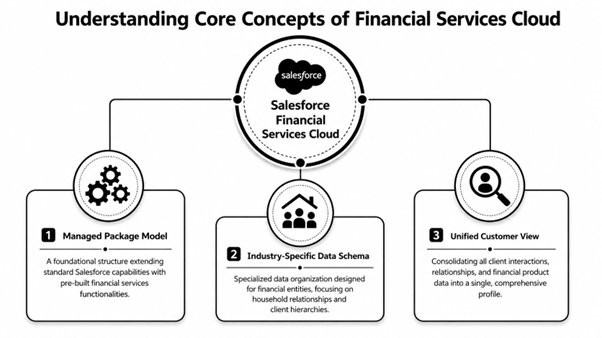
Banking teams produce account opening packets, disclosure sets, onboarding forms, lending summaries, and service letters every day. Most of the required client and product data already exists in Salesforce. The problem is turning that data into the right document set quickly and accurately.
With EDocGen connected to Salesforce, teams can trigger the correct template from the customer record, merge approved data, and generate a controlled output without rekeying. That reduces manual work, limits formatting errors, and speeds up turnaround. The banking automation use case shows how CRM data and document automation can work together to produce, approve, and deliver packets in a controlled format.
Wealth teams need more than forms and letters. They need polished presentations for portfolio reviews, planning conversations, and investment discussions. Those presentations often pull data from multiple records, combine advisor commentary with branded slides, and need to be ready fast.
EDocGen helps advisors generate governed PowerPoint presentations directly from Salesforce data instead of building decks by hand. That means fewer errors in names, balances, ownership details, and recommendations. It also helps firms move faster without sacrificing quality or brand consistency.
Insurance teams depend on repeatable output across the policy lifecycle. Quotes, policy documents, renewal packets, endorsement communications, and claims summaries all need to be accurate, consistent, and easy to trace.
Salesforce can manage the policyholder relationship and workflow status. EDocGen helps transform that data into the exact document set needed for service, compliance, and client communication.
Across all three industries, the same truth holds: the CRM record is not the deliverable. The deliverable is the packet, proposal, summary, presentation, or notice that moves the client relationship forward.
Financial services teams do not need more fields. They need a faster path from Salesforce data to client-ready output.
Salesforce organizes records, workflows, and approvals. EDocGen adds the generation layer that turns one record or many related records into business-ready documents and presentations. An example workflow is available in EDocGen's Salesforce document generation example .
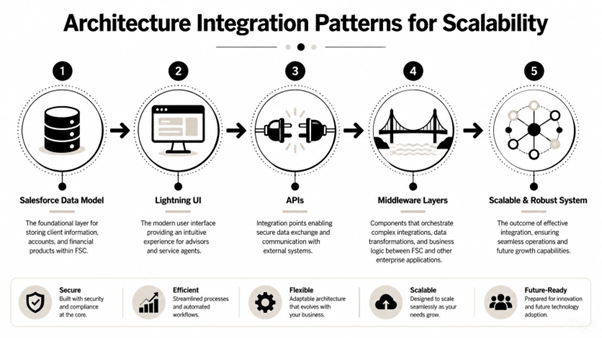
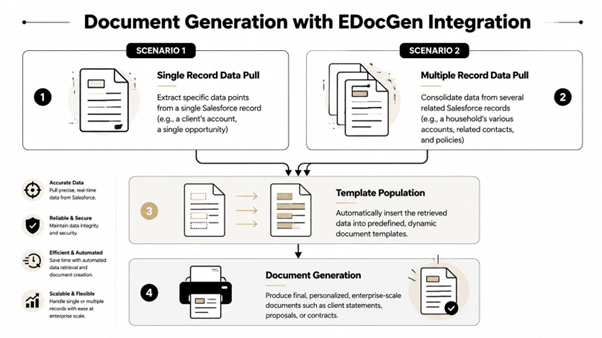
EDocGen gives teams a repeatable way to produce outputs from Salesforce without treating each request as a custom job. Teams can connect EDocGen to Salesforce through a REST API connector to generate documents from Salesforce data and attach the completed files back to Salesforce records. For teams that want a more direct in-platform option, EDocGen also offers a native Salesforce app on AppExchange .
The workflow is consistent across banking, wealth, and insurance:
That model works for onboarding packets, disclosure bundles, renewal communications, policy summaries, and client presentations. It helps teams scale output while keeping branding, structure, and data usage under control.
EDocGen's advanced document-generation software can handle complex, multi-page documents, elaborate template designs, conditional logic, and multiple data sources ( EDocGen on document generation ). That matters because enterprise outputs rarely come from one object or one simple table.
Consider a wealth firm preparing for a new client conversation. The sales representative needs a client-ready deck that reflects submitted information, follows approved messaging, and arrives fast enough to support timely follow-up.
Without automation, the process is slow. Intake arrives by form or email. Someone copies data into PowerPoint, adjusts slides, checks the latest template, sends the deck for review, and then updates Salesforce separately. Every handoff adds delay. Every copy step adds risk.
With EDocGen, the workflow is tighter. An employee completes an online form generated from an EDocGen template. That form captures the information needed for both the opportunity and the presentation.
Once submitted, EDocGen automatically generates the PowerPoint presentation using approved branding, slide order, content rules, and dynamic fields. The completed presentation is sent directly to the assigned sales representative, which shortens response time and helps protect the follow-up window.
At the same time, EDocGen creates a new opportunity in Salesforce using the same submitted data. The opportunity is created in the Investment Level stage and assigned to the correct representative. The generated presentation and the Salesforce opportunity stay connected, which gives the team a traceable link between intake, generated output, and follow-up activity.
This same pattern applies beyond wealth management. Banks can use it for account packets tied to customer or product records. Insurers can use it for renewal sets tied to policyholders and policy stages. The workflow changes by use case, but the value stays the same: less manual work, faster output, and better process visibility.
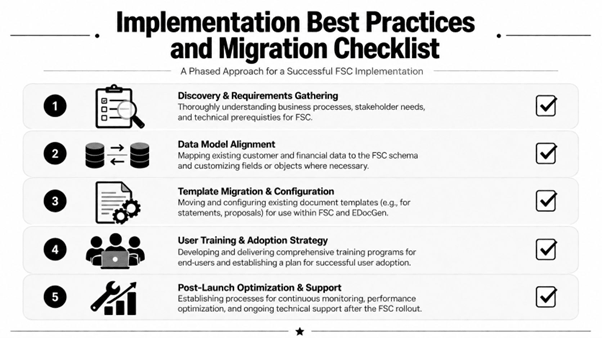
Some workflows start from one Salesforce record, such as an account or opportunity. Others need several related records, such as a household, linked contacts, and multiple policies. EDocGen's guidance also says users can upload existing documents and turn them into reusable templates, with templates built in Word, Excel, or PowerPoint before dynamic fields populate from data ( EDocGen on templates.
That flexibility matters because financial services outputs often combine data across multiple objects in a single transaction.
Many tools handle one output format well, then become limiting when the business needs another. EDocGen is built to produce Word, PowerPoint, Excel, PDF, and fillable forms from structured data, which makes it a practical choice for teams that want one document automation layer instead of separate tools for each format.
In financial services, automation only works if it fits compliance expectations. Salesforce Financial Services Cloud is often used in environments where field-level access, auditability, and role-based visibility matter. The document layer needs the same discipline.
EDocGen's compliance guidance on financial compliance document automation is relevant because the document system also needs permissions, retention logic, and secure distribution controls. EDocGen's platform overview also describes AES-256 encryption and role-based access as part of its security posture, which aligns with enterprise requirements.
A practical model is to map each requirement to a control point:
The safest approach is layered. Set permissions in Salesforce, restrict template ownership, route high-risk documents through approval steps, and log delivery in a way auditors can review later. EDocGen supports the process while Salesforce remains the system of record for the relationship and workflow.
A strong implementation should improve speed, control, and consistency in ways the business can measure. That is why KPI design should be part of rollout, not an afterthought.
|
Metric |
Definition |
Target |
|
Turnaround time |
Time from request to completed document delivery |
Shorter than the baseline established before rollout |
|
Workflow completion |
Share of requests that move through the defined approval path |
Higher than the pre-launch process |
|
Compliance exceptions |
Number of documents requiring rework because of policy or data issues |
Lower than the baseline |
|
Advisor productivity |
Number of client requests handled per advisor without extra coordination steps |
Higher than the pre-launch baseline |
|
Template reuse |
Share of recurring documents generated from governed templates |
Higher over time |
A small starter library often proves value fastest. Account opening packets, policy issuance documents, portfolio review summaries, and sales presentations are strong first candidates because they are repeatable, visible, and easy to benchmark.
The business case is straightforward. When Salesforce Financial Services Cloud is paired with EDocGen, teams can reduce handoffs, improve output consistency, and deliver a better client experience without adding administrative work.
Teams adopt EDocGen when they want more than stored data and static CRM workflows. They want a practical way to generate documents and presentations from Salesforce, keep outputs connected to the right record, and scale repeatable processes across banking, wealth, and insurance.
EDocGen is a strong fit when you need to:
For financial services teams trying to move faster without losing control, that combination is where document automation becomes operationally useful.
If you are evaluating how to streamline banking, wealth, or insurance outputs in Salesforce, EDocGen is a practical place to start.