
From a messy Excel export to a live database or ERP query, here's how automated financial statements, invoices, and tax documents actually get generated.
Manual data entry consumes 57% of an accountant's time , according to Forrester research cited by Quadient . Most of that time isn't spent deciding what a document should say — it's spent retyping numbers that already exist somewhere else.
Finance and accounting teams spend hundreds of hours in creating client-facing PDFs, Word documents, and specialized reporting packages from ERP systems, GL databases, and spreadsheets data. Manual transcription isn't just inefficient—it introduces fatal human errors, delays month-end closures, and exposes firms to compliance risks.
Accountants often treat Excel like a visual document rather than a database. Because accounting spreadsheets evolve organically over years—handed down between analysts, patched with band-aid workarounds, and cluttered with broken #REF! links—using them to generate documents manually or via brittle macros creates severe operational bottlenecks. To automate output, teams often write custom Excel VBA scripts. When a business team needs to change a document template or add a new column, the VBA script breaks, forcing them to wait on IT or a developer to fix the code.
Accounting document automation is generating, validating, and distributing financial documents — statements, invoices, tax filings, reports — directly from the data in your accounting system. By leveraging it, firms decouple their presentation layer (Word/PDF templates) from messy underlying data sources, converting structured and unstructured raw data into standardized, audit-ready financial documents in seconds.
Document generation software handles the entire lifecycle of financial output across core accounting disciplines:
Accounting document generation system requires business templates and financial data.
|
Integration |
Purpose |
Business Impact |
|
ERP Systems |
Automates financial data syncing |
Real-time accuracy in financial statements |
|
Banking Systems |
Connects transaction data to financial records |
Automated reconciliation and reporting |
|
Tax Software |
Pulls tax data for document preparation |
Fewer errors in tax filings, faster compliance |
|
Audit Tools |
Tracks compliance and document history |
A structured, searchable audit trail |
The system integrates with theses data sources to auto-generate accounting documents.
To bridge the gap between messy source systems and formatted outputs, EDocGen utilizes an engine designed specifically to handle the structural quirks of real-world financial spreadsheets.
A regional CPA firm performing employee benefit plan audits struggled with massive bottlenecks every audit season. To auto-generate confirmation letters and workpapers, they relied on a combination of messy client Excel sheets and complex, home-grown VBA macros. While the macros worked in theory, they created an operational nightmare:
The Problem with Messy Data & VBA Bottlenecks: Client spreadsheets were visually formatted rather than structured—featuring over 160 merged cell ranges, headers buried under instructions, and hardcoded formula overrides. Every time a regulatory body updated a compliance clause or a client added a new column, the audit team was trapped. Business users couldn't modify the PDF templates themselves and had to wait on IT to rewrite brittle VBA scripts. Executing macros across messy sheets constantly broke formulas and generated #REF! errors across reviewer blocks.
The EDocGen Solution: The firm decoupled its templates from the messy underlying spreadsheets. They built standard Microsoft Word and PDF workpapers using familiar editing tools. Non-technical audit managers can now update text, tweak layouts, and introduce new dynamic fields or conditional logic whenever needed—without touching code. Using EDocGen's layout-aware parsing engine, the system automatically reads messy client Excel files, isolates true row-level balances despite merged cells, and populates individualized confirmation packages in seconds.
|
Audit Challenge (Old VBA / Manual State) |
EDocGen Automated Solution |
|
Brittle VBA Code: Business teams couldn't edit PDF templates or update text without breaking macro code. |
Total Template Autonomy: Business users edit Word/PDF templates freely with zero coding required. |
|
Messy & Unstructured Layouts: Merged cells, buried headers, and offset data ranges broke standard mail-merges. |
AI Layout Parsing: Isolates true data keys and values regardless of visual cell formatting or merged ranges. |
|
Rigid Schema Changes: Adding new fields or conditional rules in Excel required rewriting complex macros. |
Simple Dynamic Rules: Easily add new merge tags, dynamic tables, and conditional logic in standard documents. |
|
Formula Errors: Macro execution and manual copy-pasting triggered broken #REF! errors across sheets. |
Clean Data Pipelines: Extracts raw spreadsheet values directly, keeping underlying formulas pristine and intact. |
|
Manual Duplication: Auditors spent 4+ hours per client hand-editing employer confirmation letters. |
1-Click Bulk Generation: A single dataset automatically generates, formats, and routes hundreds of audit packages. |
Result: By handing full template control back to the business team, eliminating fragile macros, and neutralizing spreadsheet messiness, the firm cut workpaper assembly time by 90%—dropping processing time from hours per client to a few seconds.
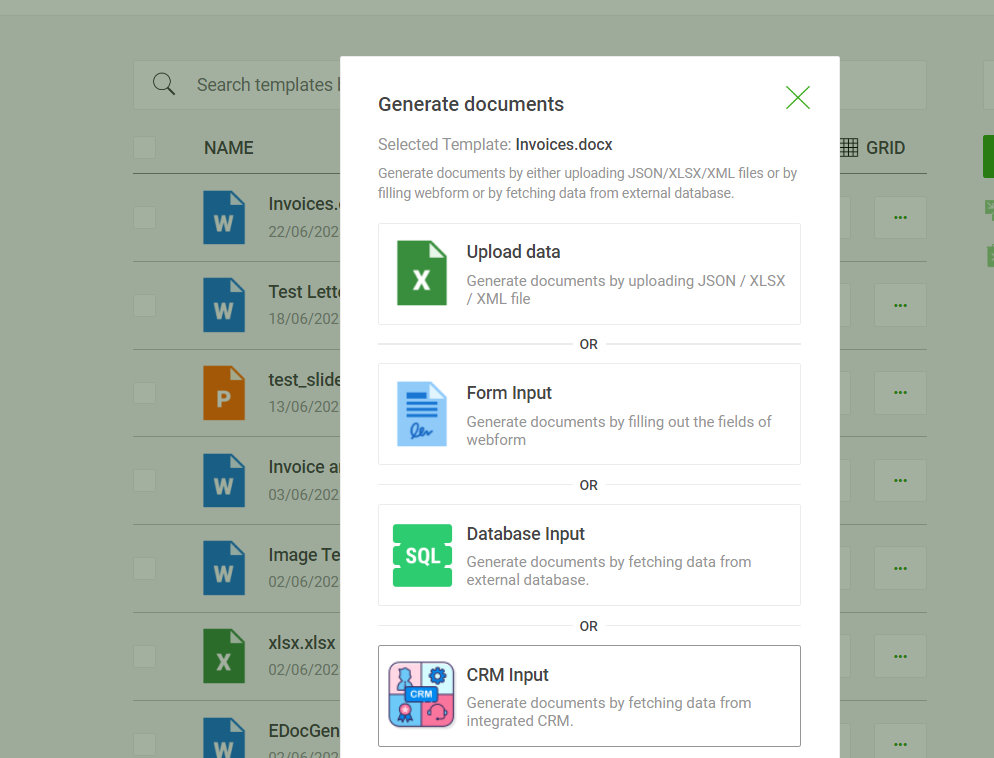
Alternatively, business users can populate Excel files into financial templates.
Tax season concentrates the same problems accounting automation solves the rest of the year — high volume, strict formatting rules, and a hard deadline. EDocGen generates common tax documents the same way it generates other financial documents:
The same audit-workpaper example above already includes a "1099 Test" sheet listing individuals and companies issued 1099s — the same many-to-one merge and AI-assisted extraction that turns messy audit data into confirmation letters applies directly to turning that list into the 1099s themselves.
|
Use Case |
How It Helps |
Example Scenarios |
|
Financial Reporting |
Automates key financial reports |
Balance sheet, income statement, cash flow reports |
|
Tax Document Management |
Streamlines tax compliance |
Tax returns, deadline tracking, compliance verification |
|
Accounts Payable/Receivable |
Automates invoice processing |
Invoice generation, payment workflows |
Banks need real-time financial reporting for lending and investment decisions; tax firms need filings that are accurate and on time; corporations process high volumes of invoices that can't afford processing delays. Manual, spreadsheet-and-email workflows make all three harder than they need to be.
|
What It Delivers |
How It Works |
Why It Matters |
|
Scalability |
Processes thousands to millions of documents in minutes |
Handles invoicing, tax filing, and reporting at scale |
|
Instant generation |
Reports, invoices, and compliance documents in real time |
Up-to-date financial records with minimal manual effort |
|
System integration |
Syncs with ERPs, CRMs, and databases directly |
Fewer data silos, fewer formatting errors |
|
Compliance and audit readiness |
Conditional formatting for GAAP, IFRS, SOX variants |
Automated validation, audit-ready records |
|
Approval and workflow automation |
Routes documents through approval chains with e-sign |
Faster processing without losing control |
|
Enterprise security |
Encryption, role-based access, cloud or on-prem deployment |
Financial data stays protected at every step |
None of this requires ripping out your existing accounting stack — EDocGen sits alongside your ERP, CRM, or database as the generation and distribution layer, not a replacement for them.
What does accounting document automation do for financial operations?
It automates financial document creation, validation, and distribution — invoicing, tax reporting, audits — for faster processing, fewer errors, and better compliance tracking.
Can EDocGen generate accounting documents from messy or unstructured Excel exports?
Yes. Real accounting exports often have merged cells, subtotal rows, and multiple sections in one sheet. EDocGen's bulk generation supports optional AI-assisted extraction that parses irregular Excel layouts into structured records before merging into the template, without requiring the sheet to be cleaned into a rigid format first.
Does EDocGen generate one document per transaction, or one per customer?
Both are supported, but for statements and invoices you typically want many-to-one mail merge: multiple transaction rows for the same customer or vendor are grouped into a single document, rather than generating a separate document per row.
Can documents be generated directly from a database instead of a file export?
Yes. For MySQL, SQL Server, or Oracle-based systems, generation can query the database directly, running against live data on a schedule or on demand, without a manual export step.
Can EDocGen generate 1099s, W-2s, or other tax documents?
Yes. Tax forms generate the same way other financial documents do: in bulk from payroll or accounts-payable data, one per recipient via many-to-one merge, with conditional logic applying the correct state or entity-type variant per recipient.
How does accounting automation maintain compliance with financial regulations?
Pre-configured conditional logic applies the right disclosures, footnotes, or formatting for GAAP, IFRS, SOX, or other regulations; role-based access and approval workflows restrict unauthorized changes; and audit-ready logs maintain full version history.
How long does implementation typically take?
Most teams are running within weeks: 1–2 days to set up templates, compliance rules, and to connect ERPs/databases for real-time data flow, and 2–4 days to train the team and finalize the rollout.