Automate Generation of Invoices
Posted by admin
Managing your payment and invoicing process is one of the most important aspects of any business

In the last two posts, we covered how to generate invoices and payment reminders. Once your customer pays the invoice, you send them a payment receipt acknowledging the payment. It’s a customer experience best practice.
The payment receipt document shows the amount paid, the date of the payment, the invoice number, and the method of payment. It is proof of a full or partial payment towards the invoice. The receipt is a legal document, combined with the invoice, which gives the full details about the transaction.
Moreover, invoice receipts are a useful and valid record of the expense for accounting purposes. For businesses, the receipt needs to be processed by the accounting department, or they may need it for an expense report.
Manually creating each receipt and sending them by mail wastes a lot of productive hours. It can be quite a pain to add line items, the totals, and calculate taxes.
If you have hundreds of customers, manually creating a large number of invoice receipts wastes productivity. Using EDocGen, you can automate the creation and delivery of invoice receipts.
In the following sections, we’ll see that with an example.
Step1- Add tags to your template:
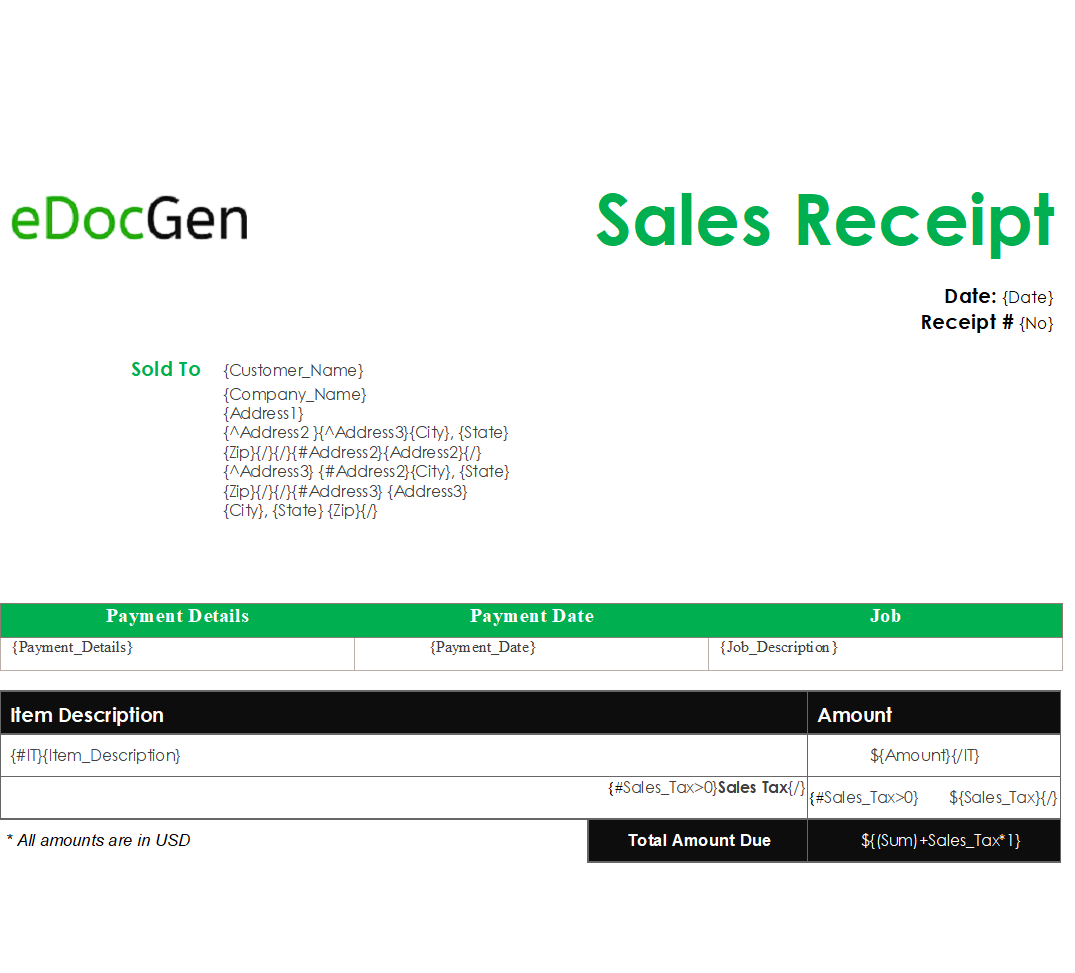
If your organization has an existing invoice receipt template, add dynamic tags to it as shown in the example below. It has dynamic text, table, and conditions.
Text tags: The dynamic text fields are tagged with { } Ex: {Customer_Name}, {Company_Name}
Table tags: We add the invoice table here. {#tableid}{/tableid} is the tag for the dynamic table. Notice the tags {#IT} {/IT} for the invoice table with table columns
Conditional statements: As you can see in the template, the address section has multiple conditions including nested conditions. It shows the correct address format, whether address2 and address3 are present or not.
Also, we’re showing the sales tax value only if it has value. Otherwise, we show blank there.
Calculations: We add sales tax to the invoice amount for calucualtiing “Total Amount Due” using {Sum+Sales_tax} tag. {Val1+Val2} adds the values Val1 & Val2.
Step2- Data Population for Bulk Generation: Upload the template into the system and populate the dynamic fields with Excel/JSON/XML data. The system generates the invoice receipts in bulk.
The following Excel generates two invoice receipts for companies ABC & DEF.

Step3 - Email the Receipts: If your Excel (JSON/XML) has the Email column, the system automatically delivers the respective invoice receipt to the company’s contact.
If you want to auto-send these emails from your business email (Custom sender email), you can set up your mail account in the system.
EDocGen can populate invoice receipt templates from Excel, JSON, or XML data sources, so you can feed in payment records exported from your accounting or billing system. Each field in your template is marked with a dynamic tag such as {Customer_Name} or {Company_Name}, and the engine fills those tags with values from your data for every receipt in a batch.
Receipt templates can include conditional logic, so the address block displays only the lines that contain data, including nested conditions for optional address2 and address3 fields. Sales tax appears only when a value exists; otherwise the line stays blank. Calculations such as {Sum+Sales_tax} compute the Total Amount Due automatically, and table tags repeat invoice line items for each product.
EDocGen supports bulk generation, so you can create hundreds of invoice receipts in one run instead of creating each one manually. Once generated, receipts can be distributed to customers as part of your automated workflow, saving the time spent adding line items, totals, and taxes by hand and sending them by mail.
Yes, EDocGen supports multi-lingual invoice receipt templates, so customers can receive receipts in their preferred language from the same automated process. Templates are built once with dynamic tags and conditional rules, which keeps formatting consistent across languages while data populates each document. Your team can reuse the template for every payment.
Posted by admin
Managing your payment and invoicing process is one of the most important aspects of any business
Posted by admin
Businesses generate hundreds of invoices every month and send them to their customers by email.
Posted by admin
It is estimated that around 20% of all the invoices across the globe are paid late.